Overview
Project date
2022
Role
Visuals, Interactions, Research
Responsibilities
UX Research,
UI/ UX Design,
Prototyping,
Usability Study
Overview
Project date
2022
Role
Visuals, Interactions, Research
Responsibilities
UX Research,
UI/ UX Design,
Prototyping,
Usability Study
Help retailer to analyse and improve sales
Help retailer to analyse and improve sales
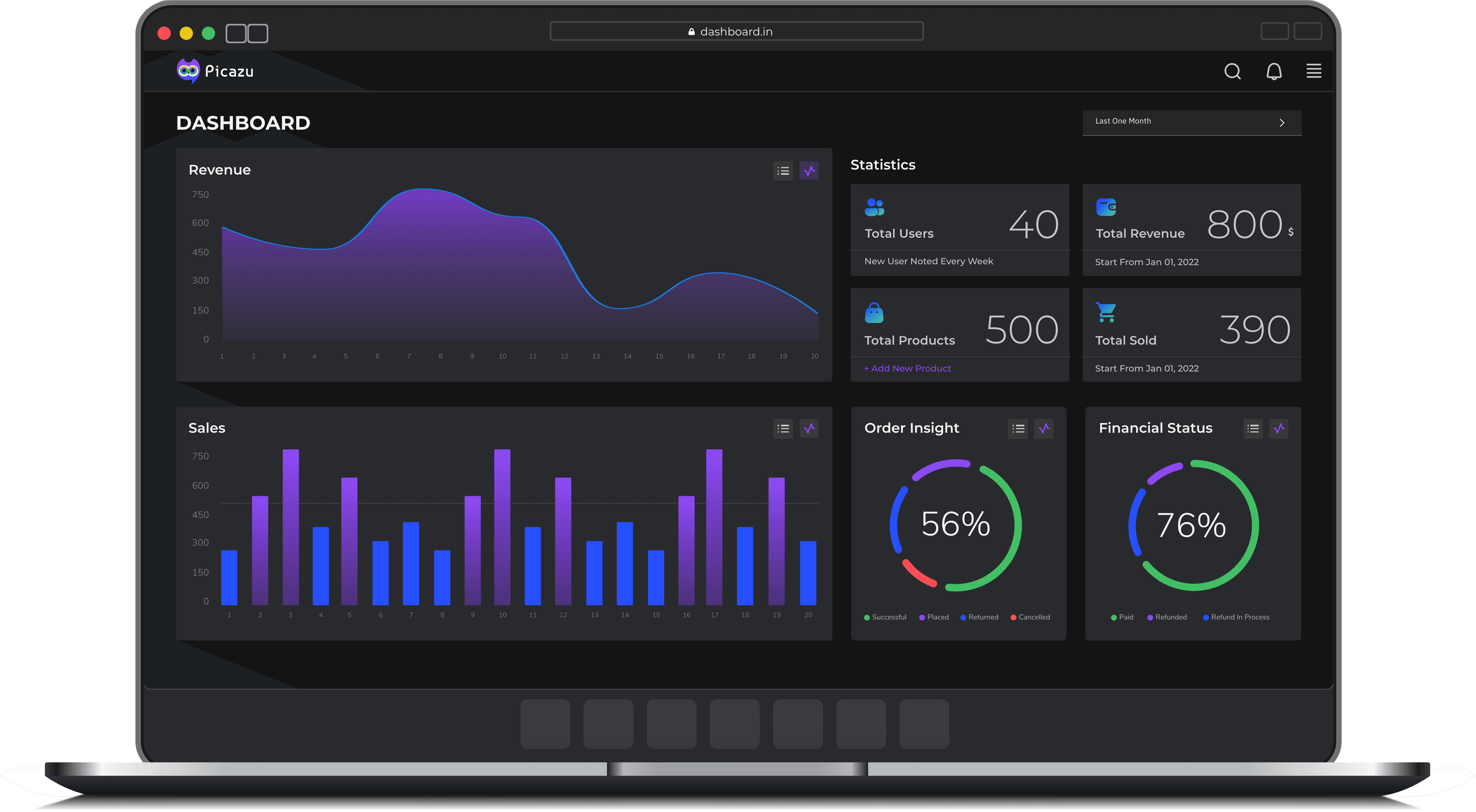
People have a challenging time gathering, maintaining, and analyzing data about their products and billing since there is a great deal of data and a short timeframe. Picazu is a platform that collects data from various sources and presents it in a graphical manner. It creates a simple visual representation of the collected data in order to make it easy for the user to comprehend and analyze his sales and billing transactions in a simple and easy way. Using a comparison and analysis of sales in different periods, it suggests retailers to sell specific products. In addition, it analyzes market trends and recommends catalogs to the user so that they can increase their product sales.
Picazu is great for quickly collecting and analyzing data, but they are also useful for learning about the current market trends and user performance in selling the products. As a result of designing an intuitive and simple interface, we believe anyone can use it.
People have a challenging time gathering, maintaining, and analyzing data about their products and billing since there is a great deal of data and a short timeframe. Picazu is a platform that collects data from various sources and presents it in a graphical manner. It creates a simple visual representation of the collected data in order to make it easy for the user to comprehend and analyze his sales and billing transactions in a simple and easy way. Using a comparison and analysis of sales in different periods, it suggests retailers to sell specific products. In addition, it analyzes market trends and recommends catalogs to the user so that they can increase their product sales.
Picazu is great for quickly collecting and analyzing data, but they are also useful for learning about the current market trends and user performance in selling the products. As a result of designing an intuitive and simple interface, we believe anyone can use it.
Kickoff
Kickoff
As a starting point for the project, I met with our team and listed a few initial questions that I wanted to consider as a UX designer, such as what are some of the common pain points your users might experience in their business, and how this project can address those pain points and be able to fulfil the needs of those users. Then, we defined the requirements, goals, scope, and milestones of this project in order to plan its development.
As a starting point for the project, I met with our team and listed a few initial questions that I wanted to consider as a UX designer, such as what are some of the common pain points your users might experience in their business, and how this project can address those pain points and be able to fulfil the needs of those users. Then, we defined the requirements, goals, scope, and milestones of this project in order to plan its development.
Few initial questions,
Few initial questions,

Do my user have impairments or disabilities to consider?
Do my user have impairments or disabilities to consider?
What do our users need the most in a product like this?
What do our users need the most in a product like this?
Where and when are my users accessing the product?
Where and when are my users accessing the product?
Have I considered all my potential users?
Have I considered all my potential users?
How familiar are my users with technology?
Who is our primary audience?
How familiar are my users with technology?
Who is our primary audience?
Preliminary Ideation
Preliminary Ideation
Affinity Map
Affinity Map
Empathize
Empathize
Meet the Users
Meet the Users

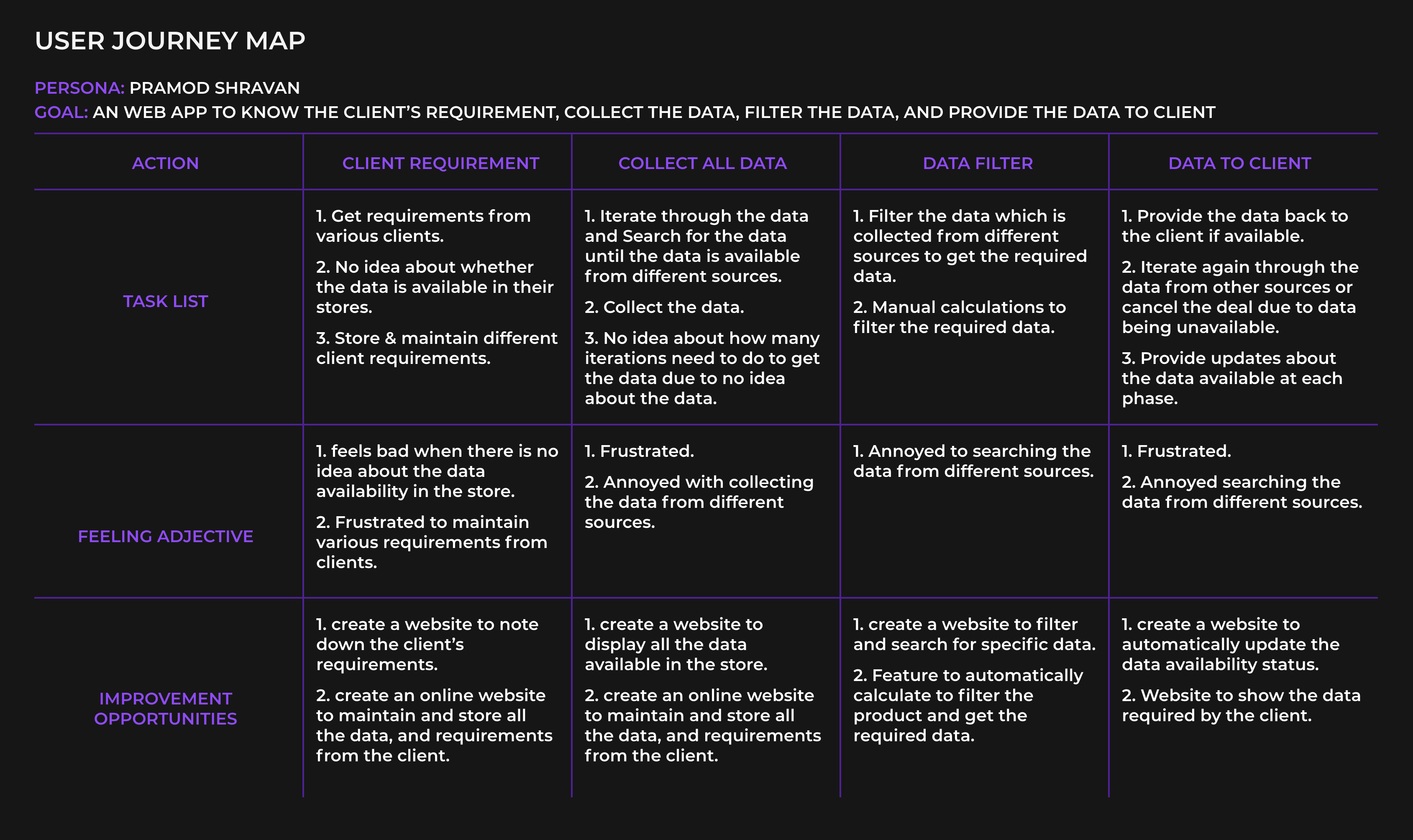
Pramod Shravan (35)
Pramod Shravan (35)
Financial Analyst
Financial Analyst
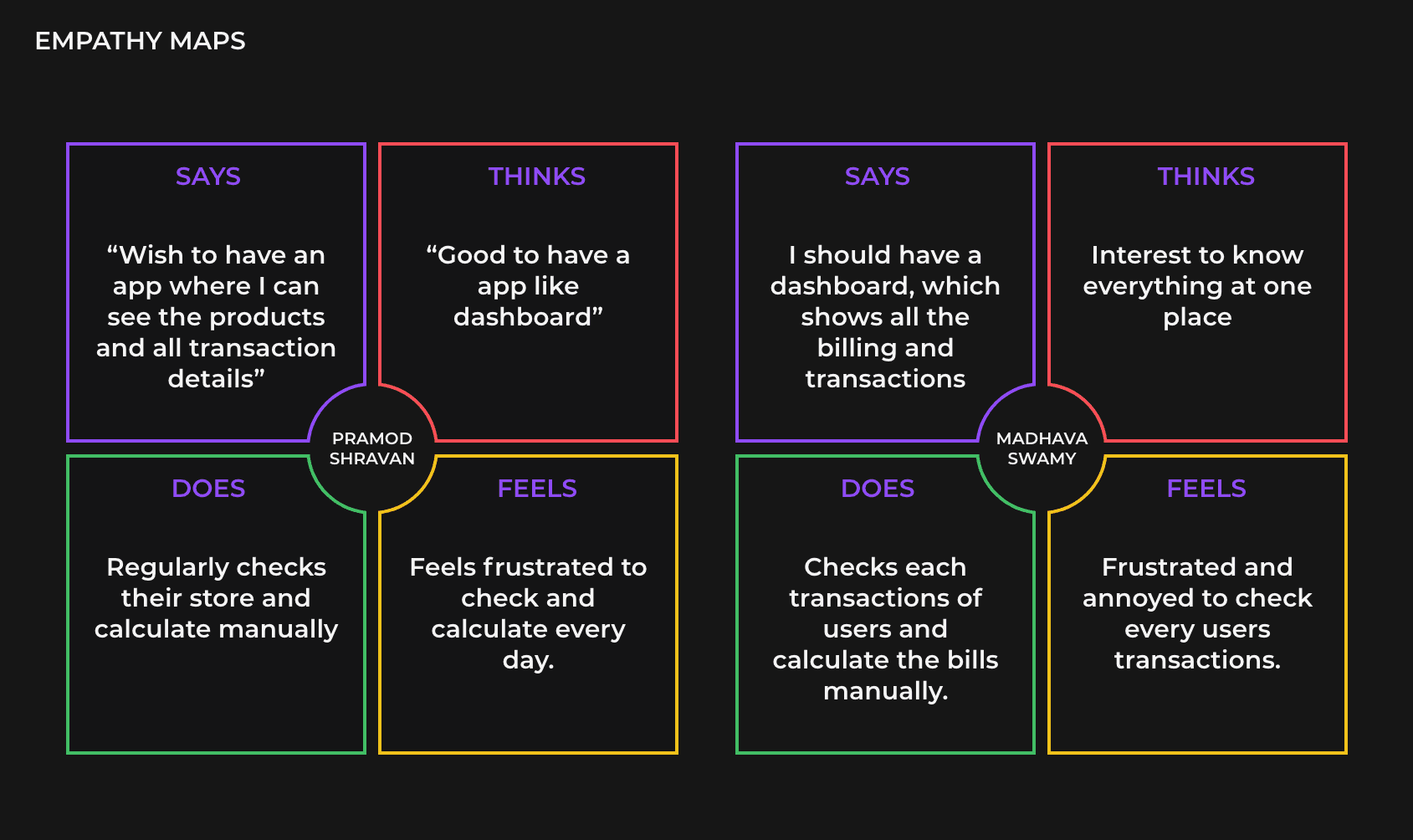
Works during the day for 8 hours and enjoy travelling during their off time to relax. They are frustrated with data filtration because of the vast collection of data and the complicated process of accessing that data. They also feel disappointed that sometimes the collected data may need to be in the proper format to access other platforms to visualise the data, which requires maintenance and quality control.
Works during the day for 8 hours and enjoy travelling during their off time to relax. They are frustrated with data filtration because of the vast collection of data and the complicated process of accessing that data. They also feel disappointed that sometimes the collected data may need to be in the proper format to access other platforms to visualise the data, which requires maintenance and quality control.

Madhava Swamy (61)
Madhava Swamy (61)
Businessman
Businessman
Retired Bank Manager who has Microgreens business to help people to get more nutritious, natural, healthy and organic food. They enjoy being with their family during their off time to relax. Sometimes as the sale increases, he might get frustrated checking each different app for transactions, sales, profit and losses etc., and wish to have an app-like dashboard where he can see everything in one place and analyse sales.
Retired Bank Manager who has Microgreens business to help people to get more nutritious, natural, healthy and organic food. They enjoy being with their family during their off time to relax. Sometimes as the sale increases, he might get frustrated checking each different app for transactions, sales, profit and losses etc., and wish to have an app-like dashboard where he can see everything in one place and analyse sales.
Competitive Analysis
Competitive Analysis
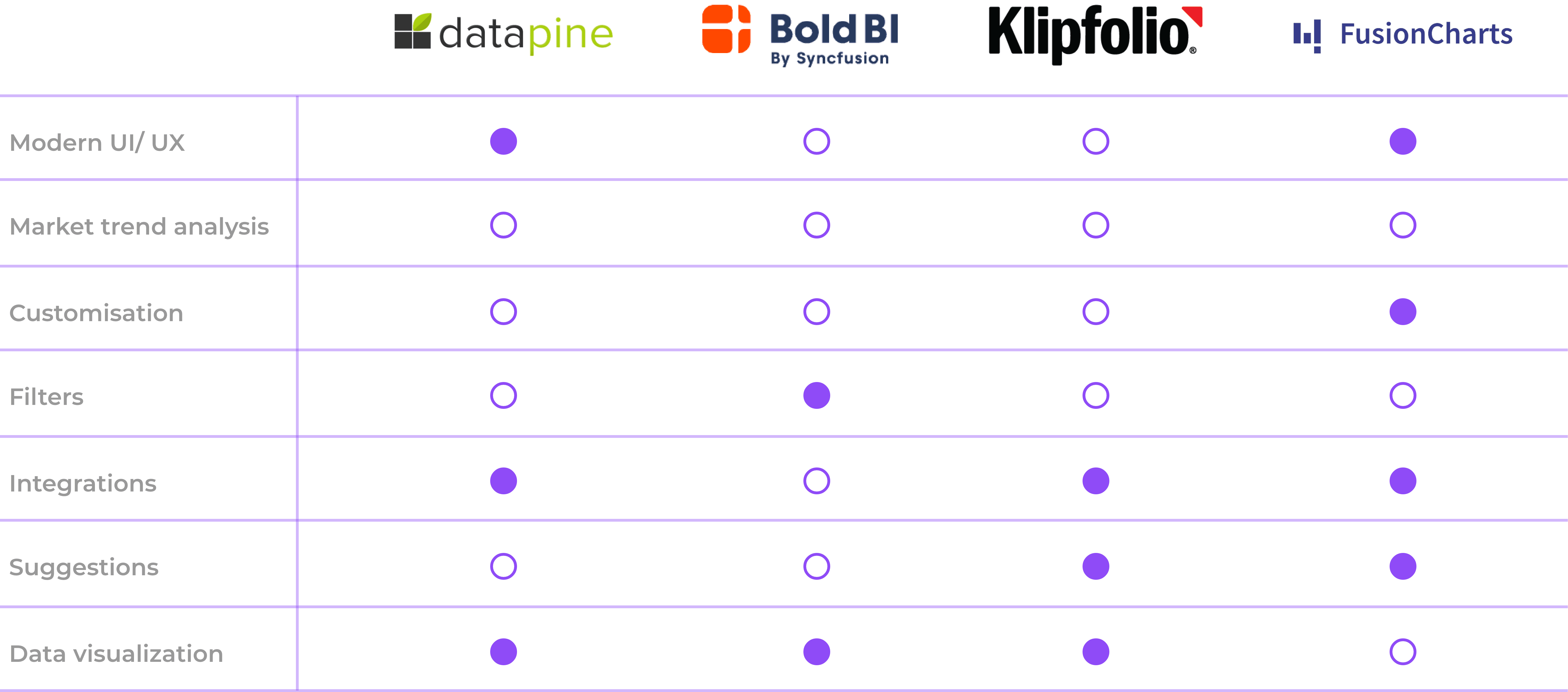
To construct a concise and solid foundation for Picazu, I had to venture out and see what the prominent dashboard applications were already doing and what user goals they were not reaching.
The majority of the features between competitors were very similar, however the main differences that we noticed were:
To construct a concise and solid foundation for Picazu, I had to venture out and see what the prominent dashboard applications were already doing and what user goals they were not reaching.
The majority of the features between competitors were very similar, however the main differences that we noticed were:
Too many screens vs simplified interaction
Too many screens vs simplified interaction
Bright/ distracting interface vs minimalistic interface
Bright/ distracting interface vs minimalistic interface
Fixed features v/s customisable features in the dashboard
Fixed features v/s customisable features in the dashboard
Predictions and suggestions to the retailers about the product and sales.
Predictions and suggestions to the retailers about the product and sales.
Generate Ideas
Generate Ideas
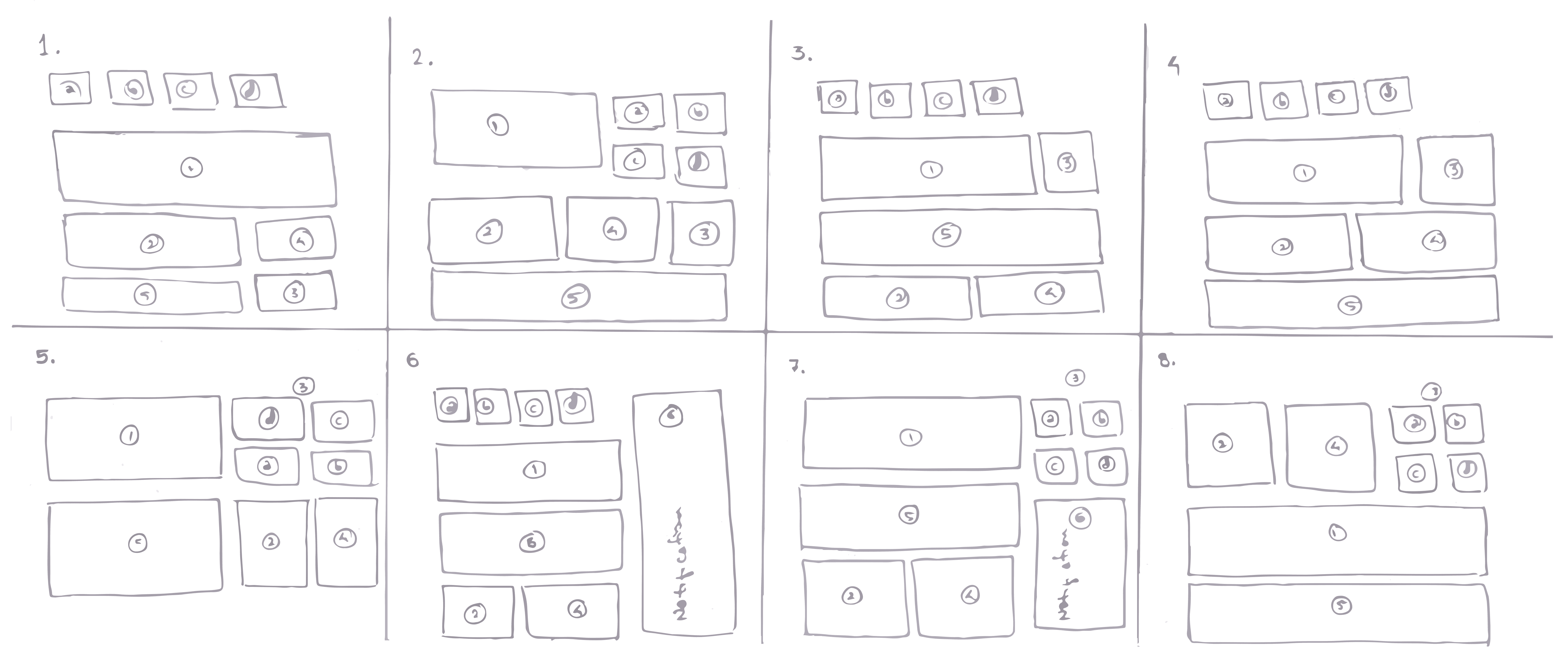
In order to get a sufficient quantity of ideas, I collected all the user's problems and needs within a set time frame and sketched eight different designs, each with a different solution for solving the user's problem, which takes only a minute for each design without any limitations or considerations for practicality.
In order to get a sufficient quantity of ideas, I collected all the user's problems and needs within a set time frame and sketched eight different designs, each with a different solution for solving the user's problem, which takes only a minute for each design without any limitations or considerations for practicality.
Crazy Eights
Crazy Eights
Priorization Plotting
Priorization Plotting
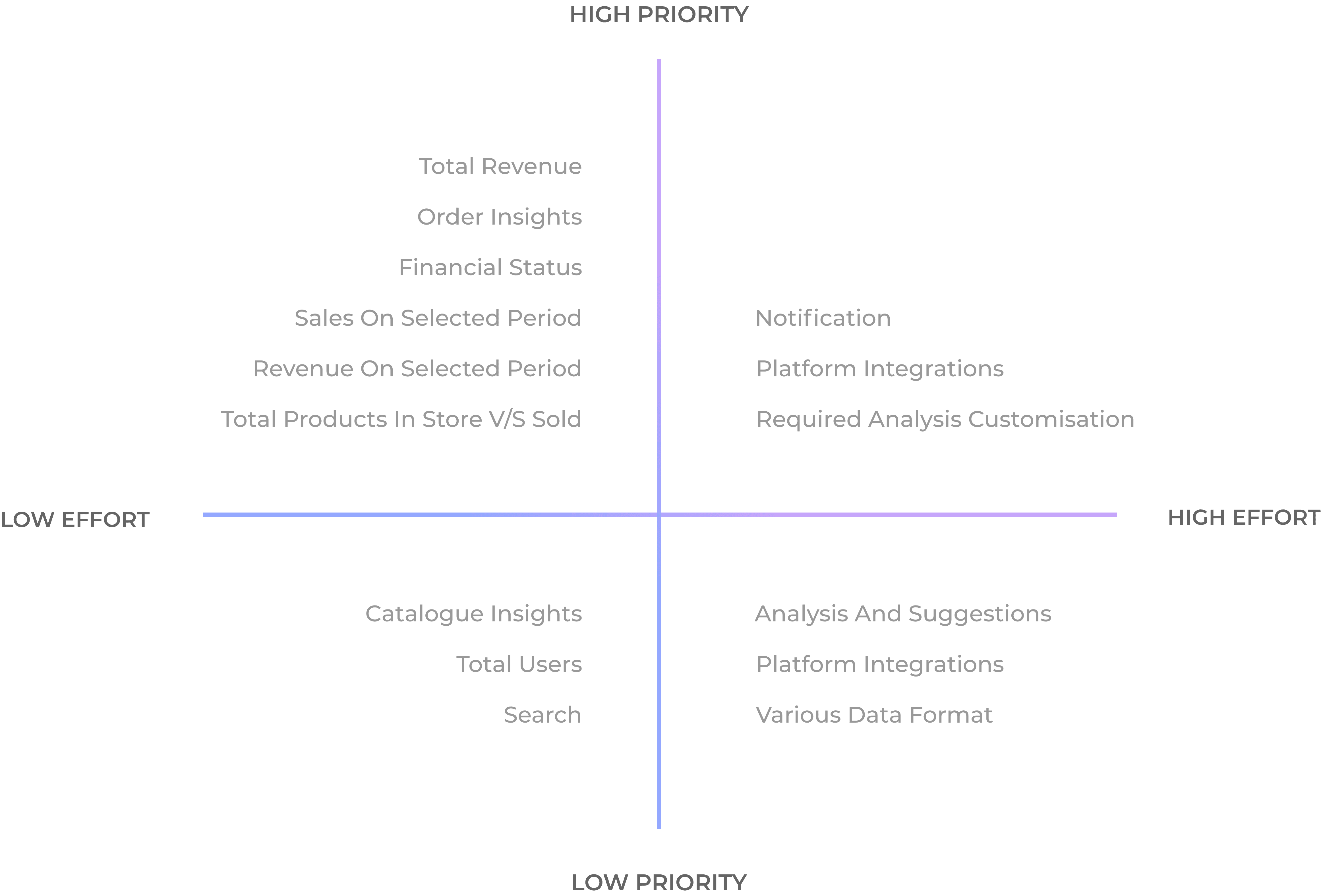
The ideas were sorted remotely and discarded that were unsuitable or completely beyond our capability. Plotted ideas on the chart in order of feasibility and importance using sticky notes. Using this prioritisation plot, we assessed and analysed what was most important in a collaborative, disciplined manner to the users and business. Furthermore, it helped us focus on our long-term goals.
The ideas were sorted remotely and discarded that were unsuitable or completely beyond our capability. Plotted ideas on the chart in order of feasibility and importance using sticky notes. Using this prioritisation plot, we assessed and analysed what was most important in a collaborative, disciplined manner to the users and business. Furthermore, it helped us focus on our long-term goals.
Information Architecture
Information Architecture
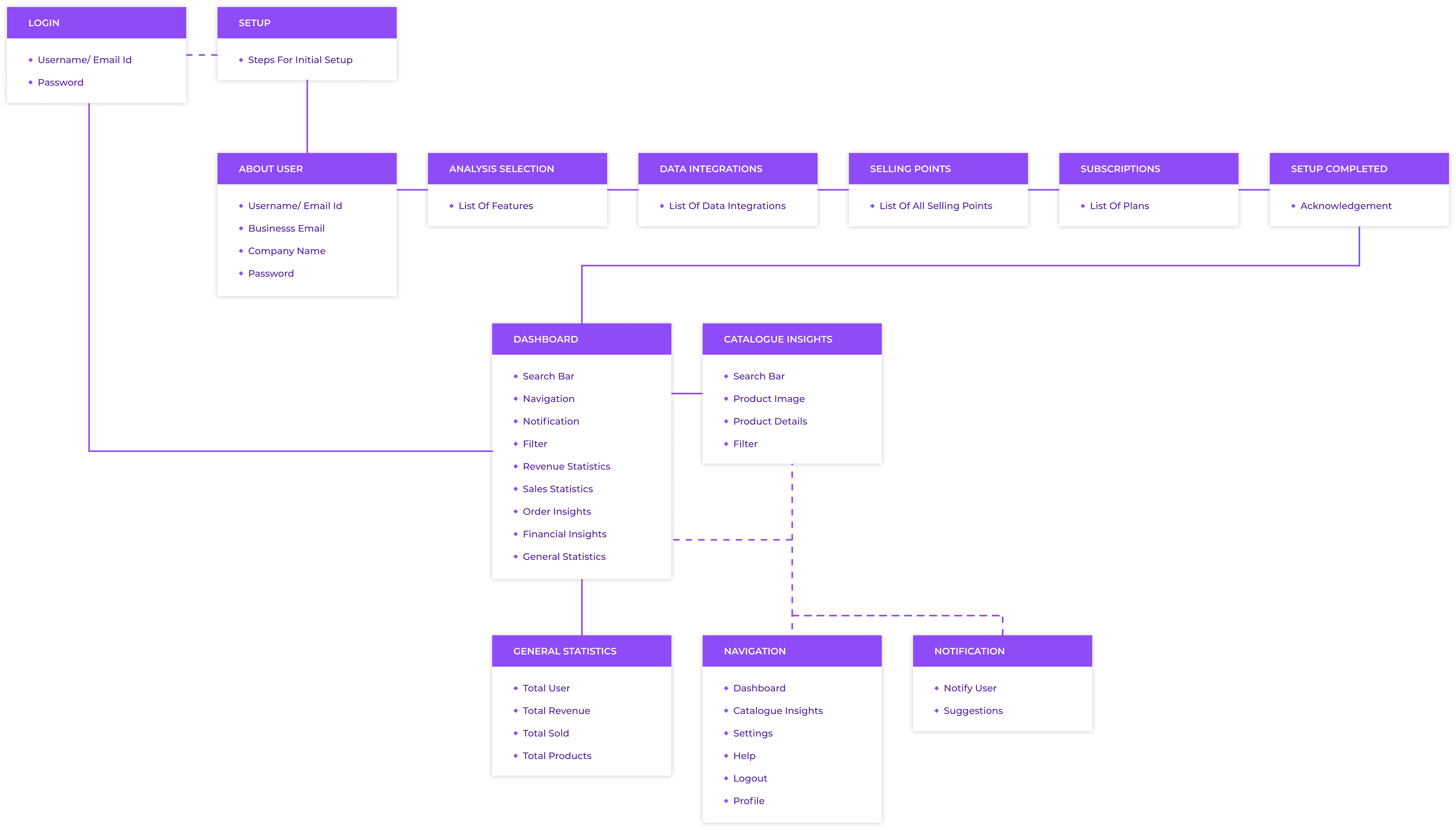
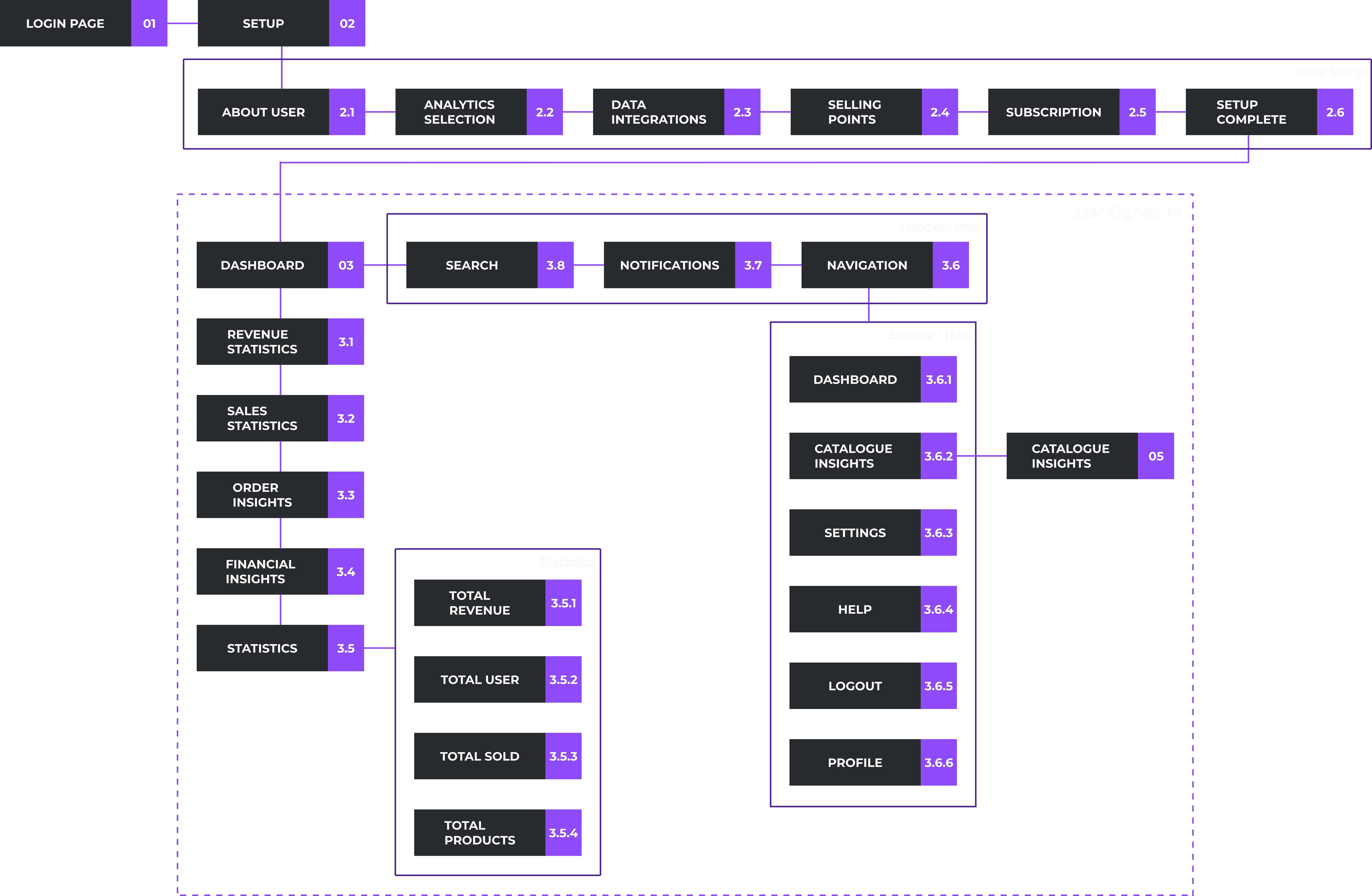
Site Map
Site Map
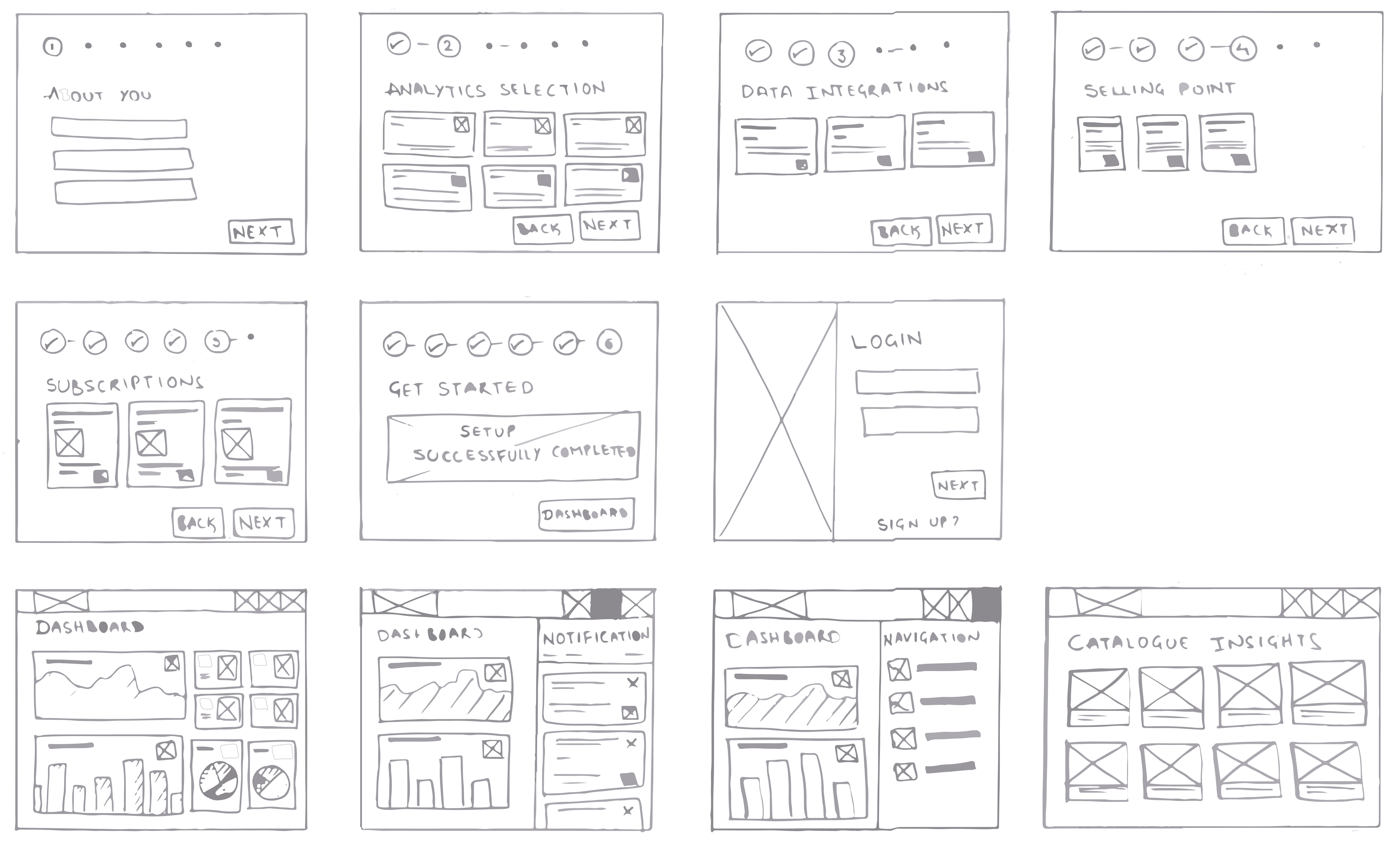
Paper Wireframes
Paper Wireframes
I like to sketch out my ideas quickly on paper to get a basic layout that highlights the intended function of the dashboard and leaves space for exploration in the digital wireframing and prototyping stages.
I like to sketch out my ideas quickly on paper to get a basic layout that highlights the intended function of the dashboard and leaves space for exploration in the digital wireframing and prototyping stages.
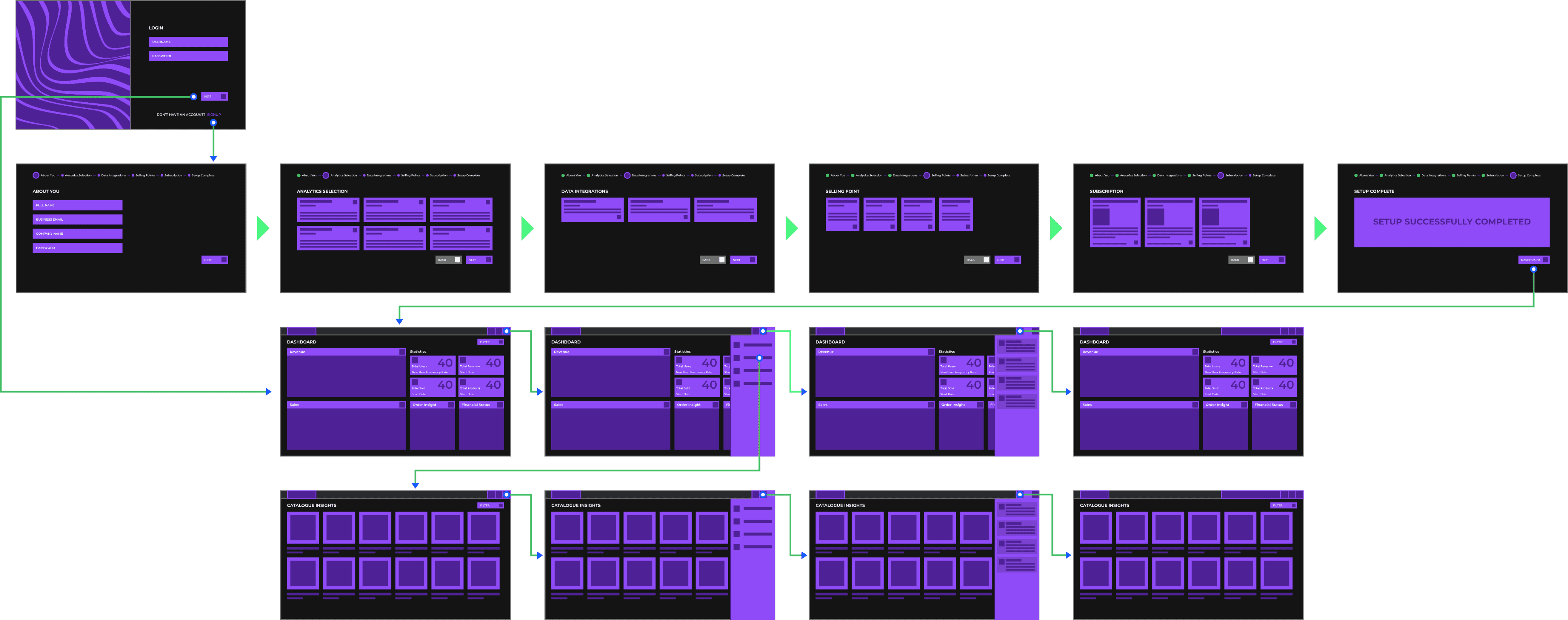
Wireflow
Wireflow
My first step was to sketch and get feedback on the paper wireframe. After considering and incorporating the changes I figured out from the feedback, I jumped into sketch and started creating a digital wireframe to provide a better picture of the dashboard's interactions and flow.
My first step was to sketch and get feedback on the paper wireframe. After considering and incorporating the changes I figured out from the feedback, I jumped into sketch and started creating a digital wireframe to provide a better picture of the dashboard's interactions and flow.
Hi-Fi Prototype
Hi-Fi Prototype
Following the wireframes and the team's understanding of the interactions, I began working on the UI design. The following were some key aspects I wanted to keep in mind:
Following the wireframes and the team's understanding of the interactions, I began working on the UI design. The following were some key aspects I wanted to keep in mind:
Using colour combination for better contrast, font and icon sizes to make users see every thing clearly
Using colour combination for better contrast, font and icon sizes to make users see every thing clearly
Using colours to differentiate the clickable buttons, icons v/s non-clickable information icons
Using colours to differentiate the clickable buttons, icons v/s non-clickable information icons
Using brand colors to communicate with the user that they were on the statistics of thier product through our dashboard
Using brand colors to communicate with the user that they were on the statistics of thier product through our dashboard
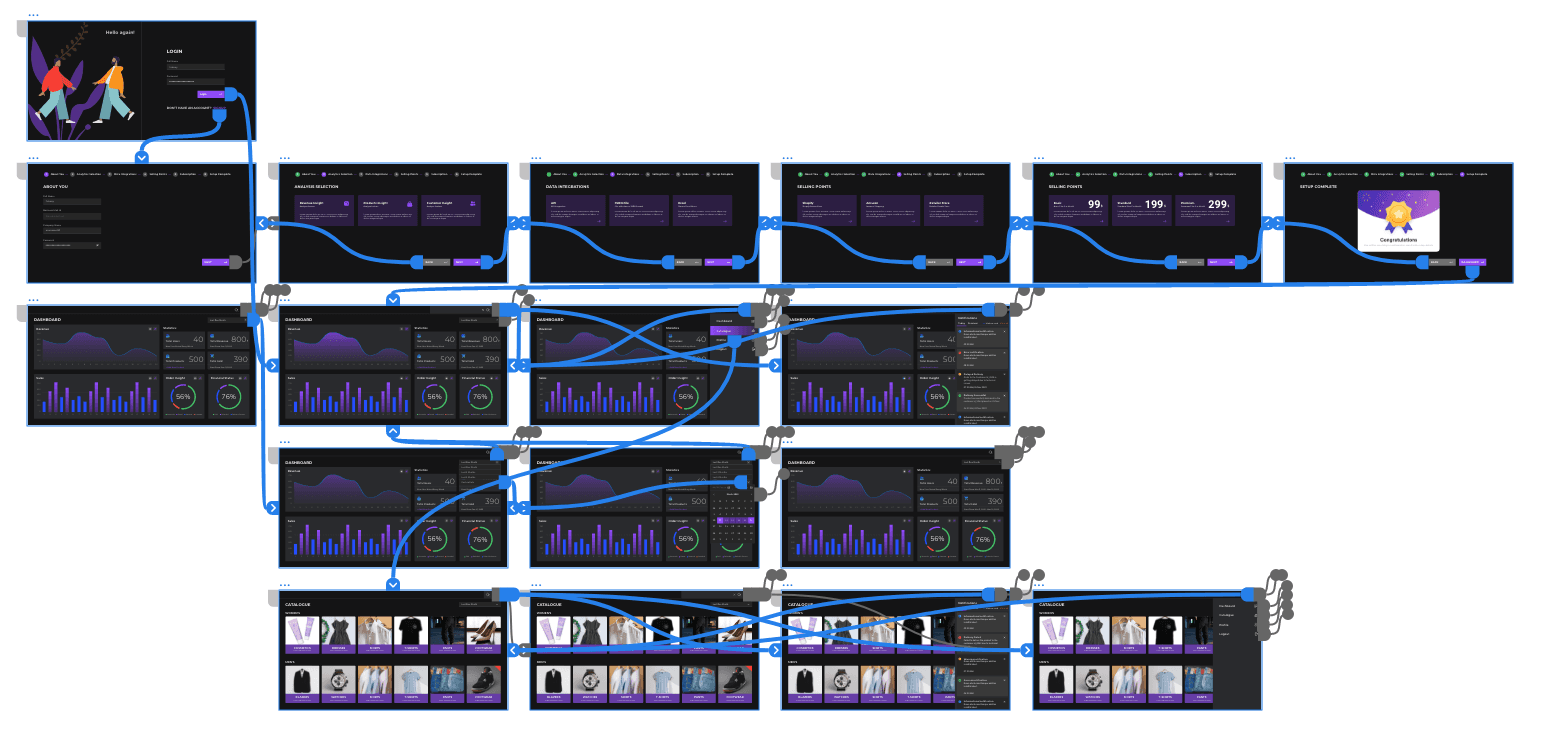
With the visual look and feel approved, I moved on to the final part of this project, creating a high fidelity prototype
With the visual look and feel approved, I moved on to the final part of this project, creating a high fidelity prototype
Principles
Principles
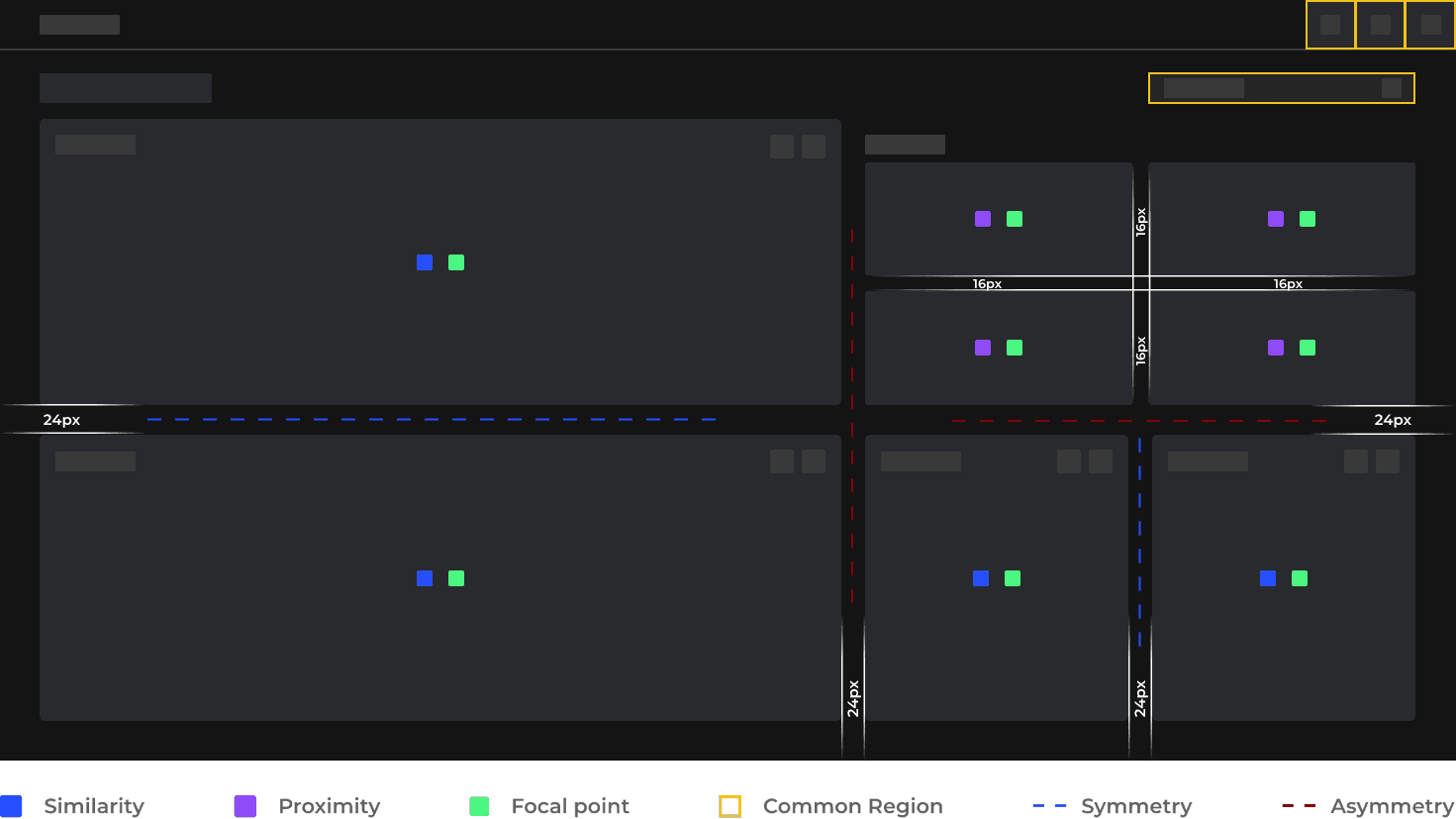
Some of the UI/ UX principles are being applied from starting with sketching the basic layouts to designing the high-fidelity prototypes. These principles helped me to,
Some of the UI/ UX principles are being applied from starting with sketching the basic layouts to designing the high-fidelity prototypes. These principles helped me to,
Understand and use visual hierarchy, background shading, gradients, how to group similar items and distinguish different ones.
Understand and use visual hierarchy, background shading, gradients, how to group similar items and distinguish different ones.
Direct the user attention to specific point of focus and getting the user to take specific actions.
Direct the user attention to specific point of focus and getting the user to take specific actions.
Design pleaseing and intuitive UI to use.
Design pleaseing and intuitive UI to use.
Style Guide
Style Guide
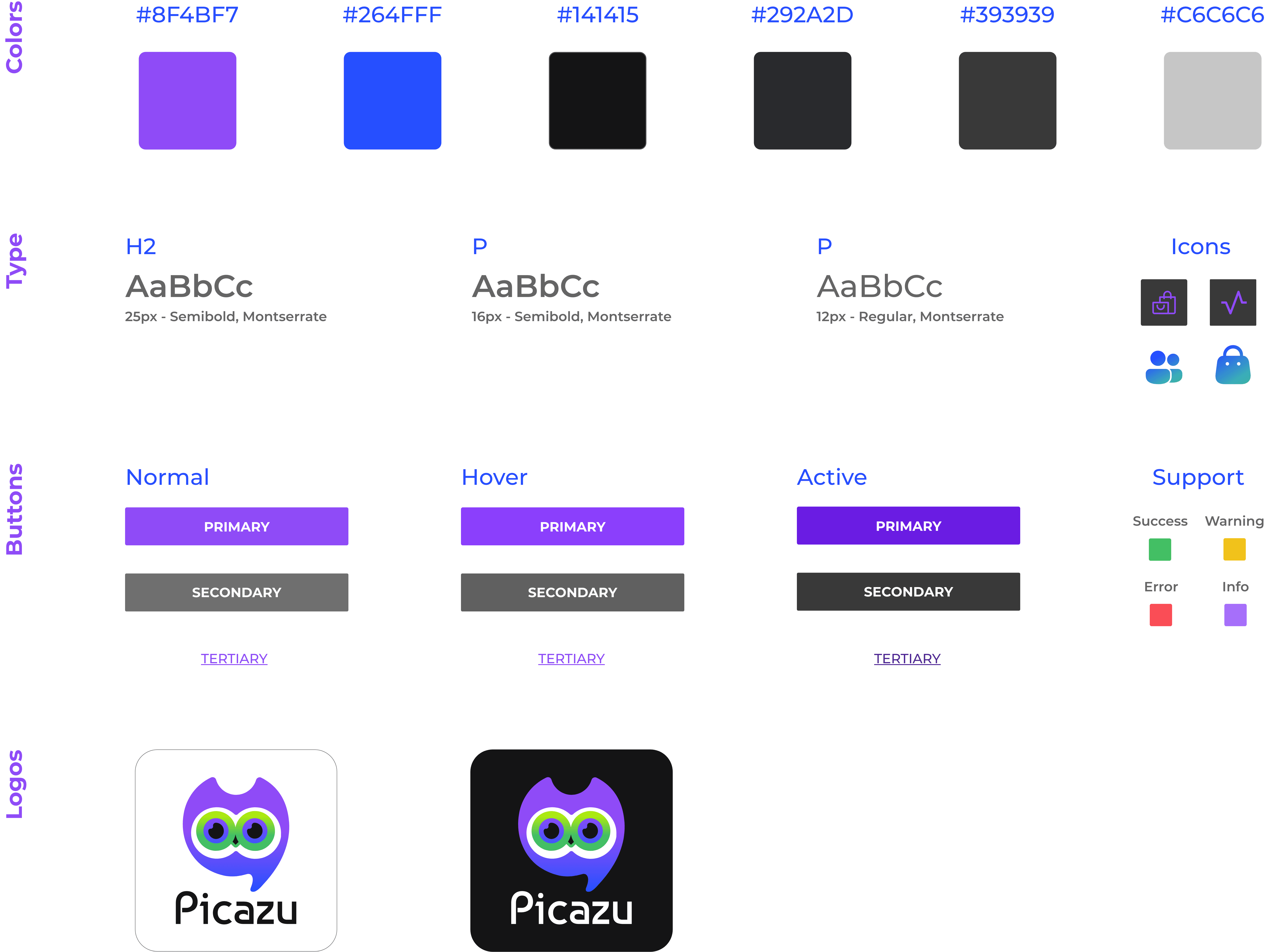
Incorporating cool and comfortable colours like purple as a secondary colour evokes a sense of peace, wisdom, and pride in users. Paired with black as the primary color, the design conveyed power, ambition, formality, and peace to users and was the perfect match for Picazu's branding. The main typeface of choice for the app is Montserrat, I felt this typeface is best fit for the app because of the shape, type of serif and the overall style of the letters.
Incorporating cool and comfortable colours like purple as a secondary colour evokes a sense of peace, wisdom, and pride in users. Paired with black as the primary color, the design conveyed power, ambition, formality, and peace to users and was the perfect match for Picazu's branding. The main typeface of choice for the app is Montserrat, I felt this typeface is best fit for the app because of the shape, type of serif and the overall style of the letters.
Outcome
Outcome
It was with excitement and enthusiasm that we moved beyond the vision of not just better analysis by the retailers, but also our ability to be able to analyse and suggest the market trends to them in order to help them increase their sales, which was the primary goal and outcome of our venture. Our approach is probably not the best out there, but I believe most users found it to be useful. Also, The project gave me a chance to play around with the new features in Adobe XD and experiment with colour combinations, in addition to the Picazu’s features.
It was with excitement and enthusiasm that we moved beyond the vision of not just better analysis by the retailers, but also our ability to be able to analyse and suggest the market trends to them in order to help them increase their sales, which was the primary goal and outcome of our venture. Our approach is probably not the best out there, but I believe most users found it to be useful. Also, The project gave me a chance to play around with the new features in Adobe XD and experiment with colour combinations, in addition to the Picazu’s features.